NifTycoon
Security Architecture Verified

NifTycoon is certified ISO/IEC 27001:2022 for Enterprise Security Governance protocols.

Schedule Free Consultation
Smart Student Attendance Management System

Student Attendance System for Offline & Online Classes

Track student attendance automatically with QR-based offline attendance and Zoom-integrated online attendance - while controlling student access, monitoring fee status and managing everything from one centralized platform.

ONE STUDENT. ONE LINK. ONE ACCESS.
Offline QR Attendance Online Zoom Attendance Student Panel Fee Control Attendance Reports
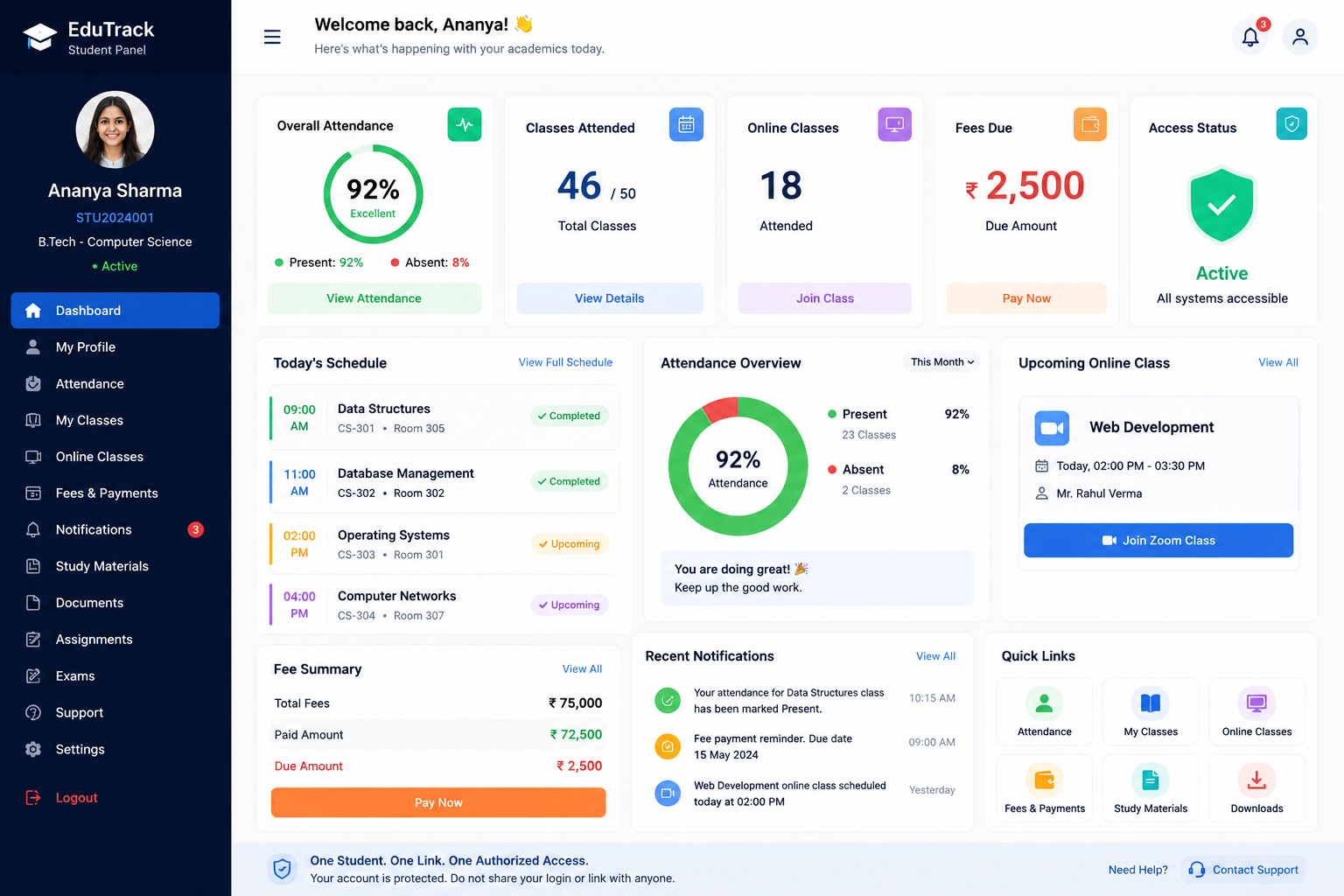
Student Dashboard ● ● ●
Present
92%
Absent
8%
Classes
46/50
Status
● Active
QR Scan
Verify
Recorded
Secure Access
Fee Status
Reports
Student Panel

One controlled access point

QR Attendance

Fast offline classroom scanning

Zoom Attendance

Track online classes

Access Control

Reduce unauthorized sharing

Fee Status

Identify fee-due students

Smart Reports

Attendance & fee analytics

Attendance Management Without Manual Work

Traditional attendance methods create problems: paper registers, Excel sheets, proxy attendance, duplicate records, and difficulty tracking online participation.

Traditional Problems
  • Paper registers & Excel sheets
  • Proxy attendance & duplicate records
  • Students sharing access links
  • Difficulty identifying absent students
  • Separate fee and attendance records
  • Difficult monthly reporting
Smart Attendance System
  • Digital attendance records
  • QR-based student verification
  • One student, one link, one access
  • Real-time attendance tracking
  • Connected fee status & access
  • Automated reports & analytics
Software Snips

Student Panel

Admin/Faculty Dashboard
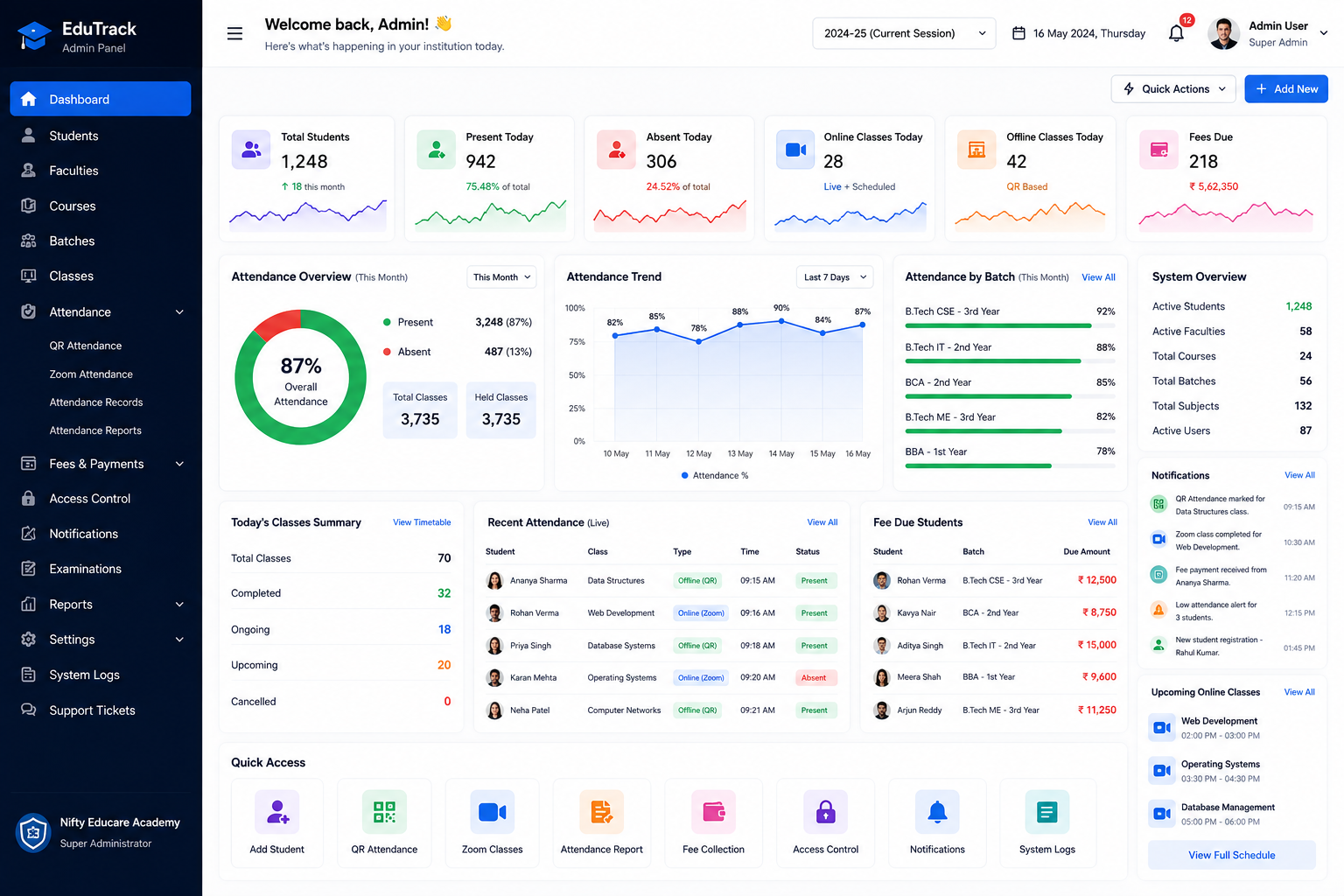
Attendance Overview Panel
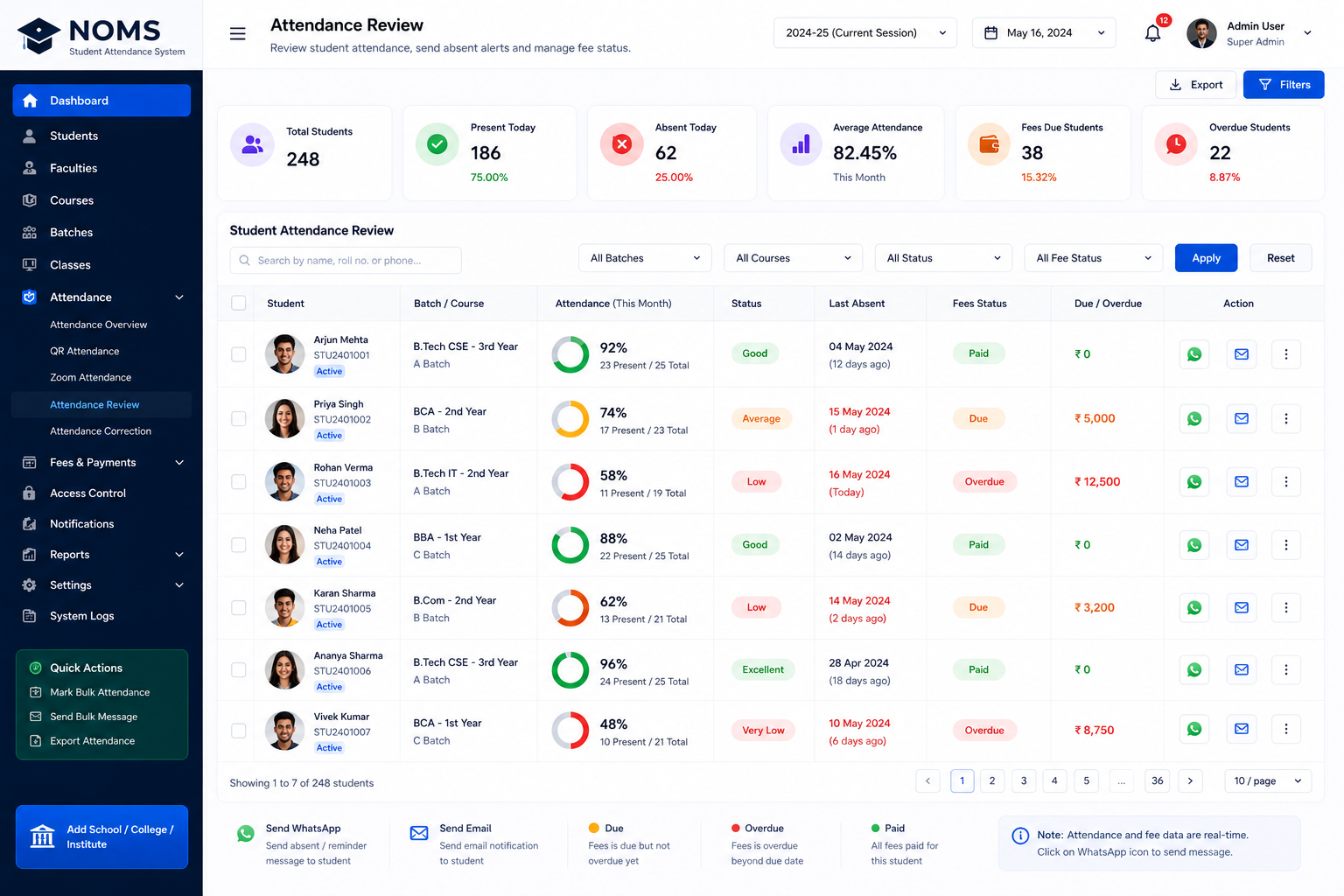
Zoom + Software Integrator
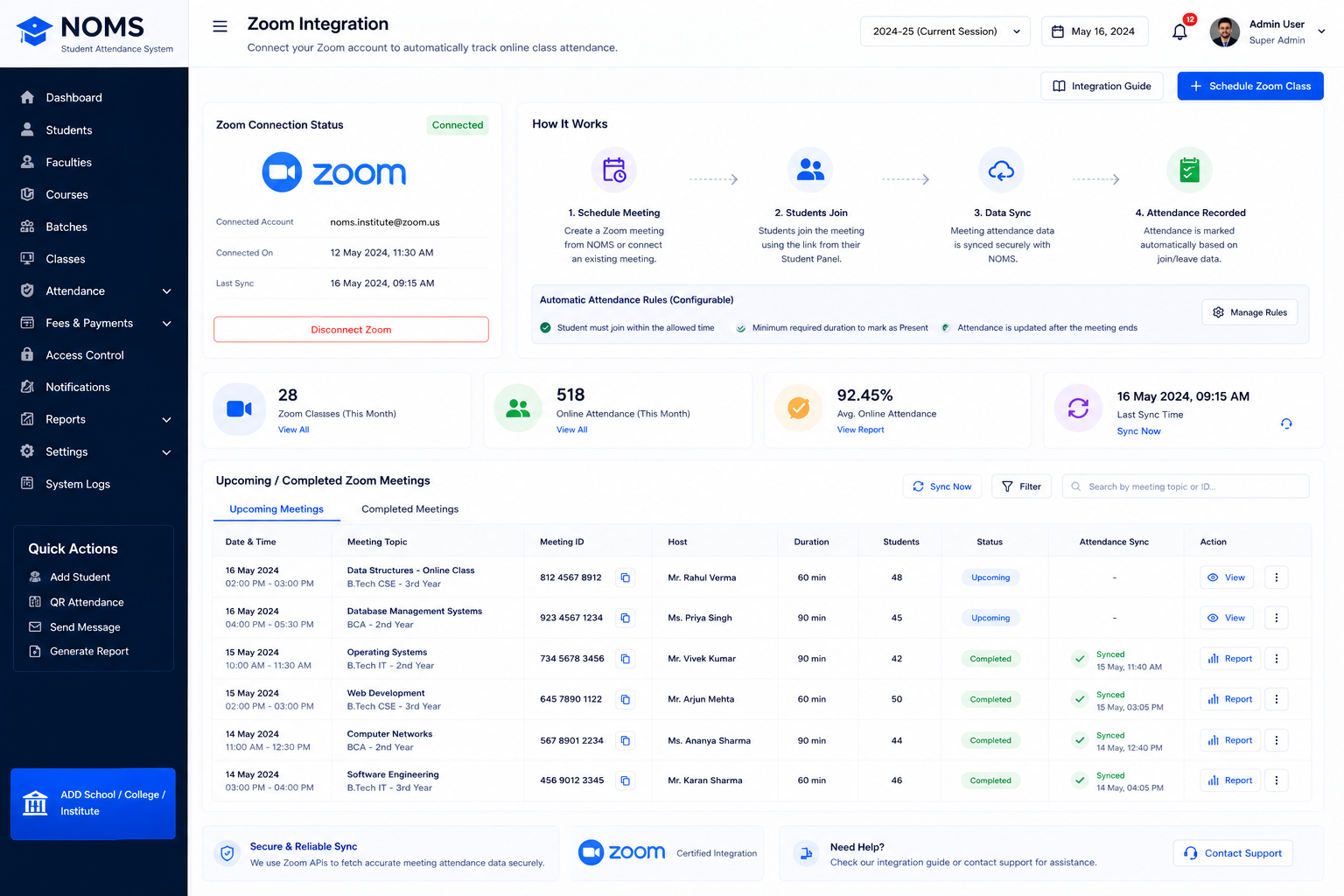
One System for Offline & Online Attendance
Attendance Type How It Works
Offline Student scans classroom QR code through authorized panel
Online Student joins scheduled Zoom class through student panel
Verification Student account is identified and validated
Attendance System records attendance with timestamp
Reports Admin can view comprehensive attendance reports
Monitoring Student status can be tracked in real-time
Core Security Concept
One Link. One Student. One Authorized Access.

Each student receives a unique, controlled student panel access identity. The system is designed to prevent shared-link and unauthorized multiple-access abuse through controlled student access.

Student Registration
Unique Student Account
Authorized Panel Access
Attendance & Class Access
Fee Status Verification
Access Permission

Designed to prevent shared-link and unauthorized multiple-access abuse through controlled student access.

Problem

Stop Sharing Student Links

A normal class link can easily be shared with friends, opened from multiple devices, used by another person, difficult to track, and difficult to connect with actual attendance.

Solution: The student panel becomes the controlled entry point.

Student → Authorized Panel → Class/Attendance → Verification → Record

ONE LINK ONE STUDENT ONE ACCESS

Controlled Student Access

Each student receives one authorized panel access. Multiple access attempts can be detected and restricted according to configured rules.


Verified

Unique

Controlled
Offline QR Attendance System
QR-based attendance

Student scans classroom QR using authorized panel

Real-time tracking

Attendance recorded with timestamp and session details

Student identification

System validates student account before recording

Attendance reports

Daily, weekly, monthly, student-wise and class-wise

Attendance correction

Admin approval for corrections when needed

Attendance percentage

Automatic calculation of attendance percentages

How QR Attendance Works
1Create Session
2QR Generated
3Student Scans
4Verified
5Recorded
Online Attendance Through Zoom Integration

No manual online attendance. Students attend scheduled online classes through the configured Zoom workflow.

Zoom Attendance Flow
1 Student Panel → Scheduled Class
2 Student Joins Zoom Meeting
3 Attendance Data Captured
4 Attendance Recorded in System
Zoom Integration

Connect with scheduled Zoom classes

Join & Leave Tracking

Where available: join time, leave time, duration

Online Attendance Reports

Class-wise and student-wise online attendance

Exact attendance calculation depends on the configured Zoom integration and meeting data available through Zoom.

Present, Absent & Attendance Percentage - Automatically Organized
92%
Present
8%
Absent
92%
Attendance
46/50
Classes Attended

Daily, monthly, course, subject, batch and student attendance with percentage and trends.

Fee Due Detection + Student Access Control

Attendance + Fees + Access Control in One System

Fee Status Workflow
Student Account → Fee Status Check
✓ Fees Paid → Access continues
✗ Fees Due → Admin-configured access rule applies

Institutions control the business rules and access configurations.

Fee Status

Paid amount, pending amount, due date

Fee Reminders

Automatic reminders for due fees

Access Rules

Configure restrictions based on fee status

Smart Student Access Blocker
🟢 Active

Student can access permitted services

🟡 Fee Due

Student receives configured reminders/restrictions

🔴 Access Restricted

Access is restricted based on administrator-defined rules

Administrators can configure which services are affected. Fee status does not automatically block every system function unless specifically configured.

Student Dashboard
Student Panel - The Heart of the System
Profile
Attendance
Class Schedule
Online Classes
Fees
Notifications
Study Materials
Access Status

The student does not need multiple links for different services. The student panel becomes the central access point.

Teacher / Faculty Panel
Assigned Classes

View and manage assigned courses/batches

Generate QR

Generate/display QR for classroom attendance

Online Class Management

Manage Zoom class details and monitoring

Student List

View students and attendance status

Attendance Correction

Request corrections with admin approval

Reports

Class-wise and student-wise reports

Admin Dashboard
1,240
Students
186
Present Today
24
Absent Today
12
Fee Due
4
Restricted
6
Online Classes
14
Offline Classes
89%
Attendance
Admin Features
Student Management Faculty Management Course & Batch QR Attendance Zoom Integration Fee Management Access Control Reports & Analytics
Designed to Reduce Proxy Attendance and Shared Access
Student-Specific Access

Each student has unique controlled access

QR Session Attendance

Session-specific QR codes with timestamps

Online Participation Records

Zoom join/leave data where available

Account-Level Mapping

Attendance mapped to individual accounts

Access Monitoring

Monitor access patterns and multiple sessions

Audit History

Complete audit trail for attendance and access

No technology can eliminate every possible form of attendance fraud. These controls help reduce risk.

Multiple Access Detection

The system can be designed to monitor configured access patterns such as:

Multiple Sessions
Repeated Logins
Unusual Patterns
Unauthorized Attempts

System Response: Detect → Flag → Notify → Restrict → Admin Review

Attendance Reports
Daily Attendance Weekly Attendance Monthly Attendance Student-wise Batch-wise Course-wise Online Attendance Offline Attendance Absent Students Low Attendance Fee Due Students Access Logs

Export to Excel / CSV / PDF where supported.

Low Attendance Alerts

Administrators can configure attendance thresholds.

Attendance < 75% Warning
Student Notification Sent
Faculty/Parent Notification Optional

Assumes a configured threshold. Institutions set their own rules.

Notifications & Alerts
Attendance Alerts

Notify about attendance status

Absence Alerts

Flag absent students

Fee Reminders

Remind about due fees

Class Reminders

Upcoming class notifications

Access Restriction Alerts

Notify about access changes

Announcements

Broadcast messages to students

Channels: In-app, Email, SMS, Push, WhatsApp (where integrated)

Institution / Coaching Centre / Training Centre Use Cases
Schools Colleges Coaching Institutes Training Institutes Competitive Exam Centres Skill Development Centres Language Institutes Hybrid Learning Institutes
Hybrid Attendance
Offline + Online = One Complete System
PHYSICAL CLASS QR Scan
DIGITAL CLASS Zoom

Same Student Account

Same Attendance System

Same Reporting Dashboard
Why Choose This Student Attendance System
Offline QR Attendance Online Zoom Attendance One Student Panel Controlled Access Multiple-Access Monitoring Fee Due Detection Access Control Attendance Analytics Student Dashboard Faculty Dashboard Admin Dashboard Attendance Reports
Traditional Attendance vs Smart Attendance
Traditional Method Smart Attendance System
Paper register Digital records
Manual entry QR attendance
Manual online attendance Zoom-integrated workflow
Shared links Controlled student access
Separate fee tracking Connected fee status
Manual reports Automated reporting
Difficult monitoring Dashboard visibility
Proxy risk Access controls
Multiple systems Centralized platform
Implementation Process
1Institution Setup
2Courses & Batches
3Student Registration
4Student Panel Creation
5Faculty Setup
6Fee Configuration
7QR Attendance Setup
8Zoom Integration
9Attendance Rules
10Access-Control Rules
11Testing
12Go Live
Who Needs This Software?
Schools Colleges Coaching Centres Training Institutes Tuition Centres Skill Development Competitive Exam Centres Online Academies
Frequently Asked Questions
What is a student attendance management system?
A student attendance management system is a software platform that tracks student attendance for both offline (QR-based) and online (Zoom-integrated) classes, while also managing student access, fee status and attendance reporting.
How does QR attendance work?
QR attendance works by having students scan a session-specific QR code using their authorized student panel. The system validates the student account and records attendance with a timestamp.
Can Zoom be integrated with student attendance software?
Yes, the system integrates with Zoom to track online attendance. Students join scheduled Zoom classes through their student panel, and attendance data is captured based on available meeting participation information.
Can students share their panel link?
The system is designed to prevent shared-link abuse through controlled student access. Each student receives one authorized panel access, and multiple access attempts can be detected and restricted according to configured rules.
Can attendance software track fee dues?
Yes, the system tracks fee status and can identify students with outstanding fees. Administrators can configure access rules based on fee status to control student access.
What is a student panel?
A student panel is a secure dashboard where students can view their attendance, class schedule, online classes, fee status, notifications, study materials and more from one central access point.
What attendance reports are available?
Reports include daily, weekly, monthly, student-wise, batch-wise, course-wise, online and offline attendance, along with absent students, low attendance alerts and fee due reports.
Can the system handle large numbers of students?
The system is designed to scale according to institutional requirements and can support large student populations with appropriate configuration.
Is the student panel mobile friendly?
Yes, the student panel is responsive and accessible through mobile browsers, allowing students to mark attendance and access information from smartphones.
How much does student attendance software cost?
Pricing depends on the number of students, features, integration requirements and deployment model. Contact us for a custom quote based on your specific needs.

Stop Managing Attendance Manually.

One system for: Offline QR Attendance · Online Zoom Attendance · Student Panel · Fee Status · Access Control · Attendance Reports

See how your institution can manage online and offline attendance from one connected student platform.